

Best OLED Display Module Picks for Vivid, Low-Power Screens
2026-11-02
OLEDs promise rich blacks and eye-popping colors, yet too many modules still guzzle power or wash out under bright light. Sorting the genuinely great displays from the merely good-enough takes hands-on testing—and that’s exactly what this guide covers. Expect a shortlist of modules that stay vivid while sipping milliamps, with a few surprises from Jingda-Display that punch above their price. If your next screen needs to impress without killing the battery, read on.
Why OLED Colors Pop Without Draining Your Battery
OLED panels light each pixel on its own, so a black pixel is simply off. That means the rich reds and deep blues you see are not fighting against a backlight bleeding through. They appear on a true black canvas, which makes every hue feel more intense without pushing the whole screen to max brightness.
This also changes how power is used. On an LCD, the backlight stays on no matter what is displayed. On OLED, darker scenes and interfaces with pure black backgrounds barely sip energy. A colorful image can stay vivid because only the lit pixels draw current, and they do not need to overpower a constant glow behind them.
So the pop is not a battery-killing trick. It comes from contrast and selective illumination. You get saturated visuals at moderate brightness levels, which keeps the display efficient even when the content is loud with color.
Beyond Resolution: The Specs That Actually Matter for OLED Panels
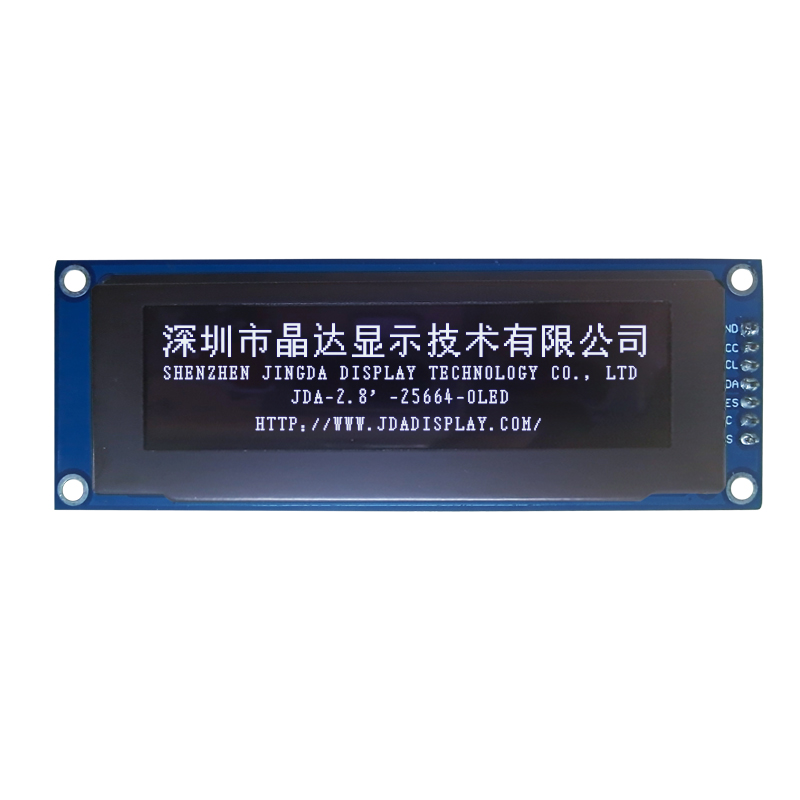
Resolution numbers sell panels, but on an OLED the real visual gaps come from peak luminance and how the panel handles near-black detail. A 4K OLED that struggles to reach 600 nits in a bright room will look flatter than a 1440p panel that hits 1,000 nits with clean HDR tone mapping. Color volume matters just as much—wide gamut coverage without enough brightness at saturated colors means HDR highlights lose punch. Pixel response is another underrated spec: OLEDs are fast, but the overdrive tuning and frame pacing can still vary, and a panel with poor pulse-width modulation dimming can cause eye strain even when the picture looks sharp.
Uniformity and aging behavior often separate great OLEDs from mediocre ones. Near-black banding, white point drift across the screen, and how quickly the panel shifts color as it ages are not printed on spec sheets, yet they affect daily use more than an extra million pixels. Brightness retention under sustained load—like a bright scene that lasts several minutes—is another hidden spec worth checking, because some OLEDs dim aggressively to protect the panel while others hold steady. Viewing angles are generally excellent, but the anti-reflective coating and the way the panel handles off-axis color shift can differ enough to matter in a lit room.
SPI, I2C, or Parallel? Matching Your Driver to Your Needs
SPI, I2C, and parallel each solve a different headache, and the best fit usually depends on what the display actually does moment to moment. If your panel mostly sits still except for occasional text or icon changes, I2C's two-wire simplicity is hard to beat — fewer traces, less routing stress, and ample bandwidth for low-refresh updates. SPI starts to pull ahead when you need sustained pixel pushes such as scrolling, animation, or partial image refreshes, since it can clock data continuously without the addressing overhead and slower rise times that often bog down I2C. Parallel is the brute-force option: wide buses move whole bytes at once, which can make a visible difference on larger screens or rapid graph redraws, but it consumes GPIO pins and tends to dominate a board layout.
A useful exercise is to count the bytes per second your worst-case screen update demands, then compare that against what each protocol can realistically deliver after protocol overhead is subtracted. Many designs look fine on paper until you account for I2C's per-transaction address bytes or SPI's chip-select toggling between every burst. Parallel cuts through some of that framing but creates its own bottlenecks in firmware, especially if the microcontroller has to bit-bang the bus because it lacks dedicated memory-mapped pins. Matching the driver means aligning the interface's strengths with the actual update pattern, not just the panel's resolution or color depth.
Avoiding Washed-Out Screens: Brightness and Contrast Tips
Plenty of people crank up brightness hoping for a punchier image, but end up with a flat, milky look. Contrast is the piece they ignore. Drop the brightness a touch lower than you'd expect and push contrast until blacks stay deep without swallowing shadow detail. Most screens have a "standard" or "sRGB" preset that gets you close—start there and tweak, rather than sliding blindly from the default.
Room lighting will sabotage your settings faster than any faulty panel. In a bright room, a screen can look washed out even with correct calibration, so nudge brightness up slightly but keep contrast steady. In a dark room, do the opposite: lower brightness significantly and leave contrast alone. Grab a grayscale test pattern and check that you can still see the difference between the darkest two or three steps—if they merge into one black blob, you've gone too far.
Color temperature gets overlooked too. A cool, blue-heavy setting makes everything look pale and lifeless. Shift toward a warmer tone, around 6500K, and you'll notice colors regain body without touching saturation. Also check your graphics driver's dynamic range setting—if it's set to limited instead of full, the screen will never show true black or peak white, no matter how much you fiddle with the monitor's own controls.
Burn-In, Flicker, and Other OLED Quirks to Watch For
OLED screens deliver deep blacks and punchy contrast, but they come with a few behavioral oddities. Burn-in, or permanent image retention, happens when static elements like navigation bars or channel logos leave a ghostly afterimage after hundreds of hours. Modern panels use pixel shifting and screen savers to slow the process, yet it still lingers as a risk for heavy users who keep a single layout on screen all day.
Flicker is another quirk that rarely shows up in spec sheets. Many OLED displays adjust brightness through pulse-width modulation, rapidly cycling the backlight on and off at lower luminance levels. Some people never notice it, but others get eye strain or headaches in dim rooms. If you are sensitive, look for panels with high-frequency PWM or DC dimming modes to ease the strain.
Less talked about are temporary retention, off-angle color shift, and near-black crushing. A faint residue can appear after displaying a bright static image for a few minutes, though it usually fades within seconds. Viewing from the side often shifts whites toward blue or pink, and very dark scenes may lose fine shadow detail due to aggressive gamma curves. None of these are dealbreakers for most people, but knowing what to expect helps set realistic expectations before you buy.
OLED Modules That Earn Their Keep in Real Projects
The modules that survive in real builds tend to be the forgiving ones. A 0.96-inch SSD1306 monochrome OLED with an I2C interface is a good example: it tolerates 3.3 V and 5 V logic, runs from a tiny LDO, and still shows legible text after being left in a cold garage. That's the kind of reliability you notice when a prototype becomes a tool you reach for daily.
Color OLEDs with SSD1351 or ST7789 drivers are trickier. They look superb indoors and in direct sunlight, but the default full-brightness setting can pull more current than the rest of the board combined. For battery-powered sensor nodes, setting the brightness to about two-thirds and calling sleep between screen updates usually extends runtime from a few hours to a few days. Also worth checking: whether the library you're using redraws the entire frame or just the changed rows. Full-frame redraws over I2C will produce visible flicker and eat CPU time.
One more thing that separates practical OLED modules from the bench-only variety is how they handle power cycling. Some modules leave the display in an undefined state after brown-out, requiring a manual reset line or a delayed init sequence. If your project will run unattended, tie the reset pin to a GPIO and add a 100 ms pause before sending commands. It's a small detail, but it prevents most of the "worked yesterday, blank today" failures.
FAQ
For a smartwatch, a 1.28-inch round GC9A01 panel or a 0.96-inch 128x64 flexible strip often hits the sweet spot. The round module keeps the face looking intentional, while the flexible strip can curve along the wrist. Both draw under 15mA at half brightness, so a 150mAh cell easily lasts through a day of testing.
Look for panels with a polarizer optimized for high ambient light, like the 1.3-inch SH1106 variant with a glare-reducing film. Run it at 70% brightness with a white-on-black theme; the perceived contrast stays high while current stays around 20mA. Avoid full-white backgrounds outdoors—they wash out faster and double the power draw.
I2C modules save pins but cap out around 400kHz on most breakouts, so animations on a 128x64 screen can feel sluggish. SPI versions easily hit 8MHz and make frame updates nearly instant. If your microcontroller has spare pins, always pick SPI for 0.96-inch or larger displays; I2C is fine for tiny 72x40 panels where you only update numbers.
SSD1306 remains the most forgiving for beginners because every major code library has presets for it. SH1106 is almost identical but needs a slight offset tweak, which can confuse first-timers. For color, SSD1351 on a 1.5-inch 128x128 module is the easiest entry point—just drive it over SPI and use standard Adafruit-style libraries.
It’s possible but tight. A 2.42-inch 128x64 SSD1309 panel draws about 25-30mA at medium brightness. A CR2032 gives roughly 200mAh total, so you’d get maybe six hours of continuous display. For anything beyond a quick demo, switch to a 300mAh LiPo or add a small boost converter with a supercapacitor buffer.
Pick a 0.91-inch 128x32 I2C module with an SSD1306 driver. Its sleep current drops below 5µA, and at 40% brightness the active draw stays around 8mA. Combine it with a deep-sleep microcontroller and a 1000mAh Li-ion cell, and you can push updates every 10 minutes for weeks on a single charge.
Flexible 0.96-inch 128x64 modules survive gentle bending around a radius of 40mm or larger, but the connector area remains the weak point. Reinforce the flex-to-PCB junction with epoxy and avoid repeated sharp folds. For early prototypes, they work well if you treat them like a thin PCB rather than a ribbon cable.
More pixels mean more charge pump activity and higher driver overhead. A 128x64 panel at full white uses about 20-25mA, while a 128x32 panel with the same content often draws under 12mA. If your UI only shows text and icons, drop to 128x32 or 64x48 to nearly halve energy use without sacrificing legibility.
Conclusion
Picking an OLED display module often starts with the promise of deep blacks and punchy colors, but the real advantage is how those pixels light themselves without a power-hungry backlight. That means a 1.3-inch panel can look brighter and more readable than a larger LCD while sipping milliamps, which is why wearables and battery-powered gadgets lean on OLED so heavily. Still, a sharp resolution alone won't save a washed-out image. You have to weigh typical brightness in nits, contrast ratio, and whether the module's glass and polarizer hold up off-angle. Driver choice matters just as much: SPI keeps wiring simple and is fine for small monochrome or 16-bit color screens, I2C works when pin count is tight and refresh speed isn't critical, while parallel interfaces earn their place on bigger, faster panels that push video or complex animations. Matching the driver to your project's update rate and bus traffic avoids headaches later.
Beyond the datasheet, OLED modules come with quirks that can bite you if ignored. Static UI elements leave ghosting or permanent burn-in, so pixel shifting, screen savers, and modest brightness levels are worth planning from the start. Flicker from low-frequency PWM dimming shows up in photos and can cause eye strain, so look for modules with higher PWM rates or DC dimming if that matters. In practical builds, the best OLED picks aren't the spec-sheet kings but the ones that survive real use—consistent brightness across production units, a flexible initialization sequence, and enough documentation to swap panels without rewriting half your firmware. Small graphic OLEDs around 0.96 to 1.5 inches handle wearables and sensor readouts well; larger 2.42-inch or 2.7-inch modules make sense for handheld interfaces where color depth and contrast actually help users read data at a glance. The goal isn't the highest resolution or the cheapest module—it's a screen that stays vivid, sips power, and keeps working after months in the field.
Contact Us
Contact Person: Vincent
Email: [email protected]
Tel/WhatsApp: 86 135 5485 1379
Website: https://www.jda-display.com/